
Stop typing your invoices. Let AI read them.
Scanee automatically extracts data from your invoices, bank statements, and any document. Your team verifies at a glance and exports as CSV, via API, or to any system.
Free trial • No credit card required • Canadian hosted data 🇨🇦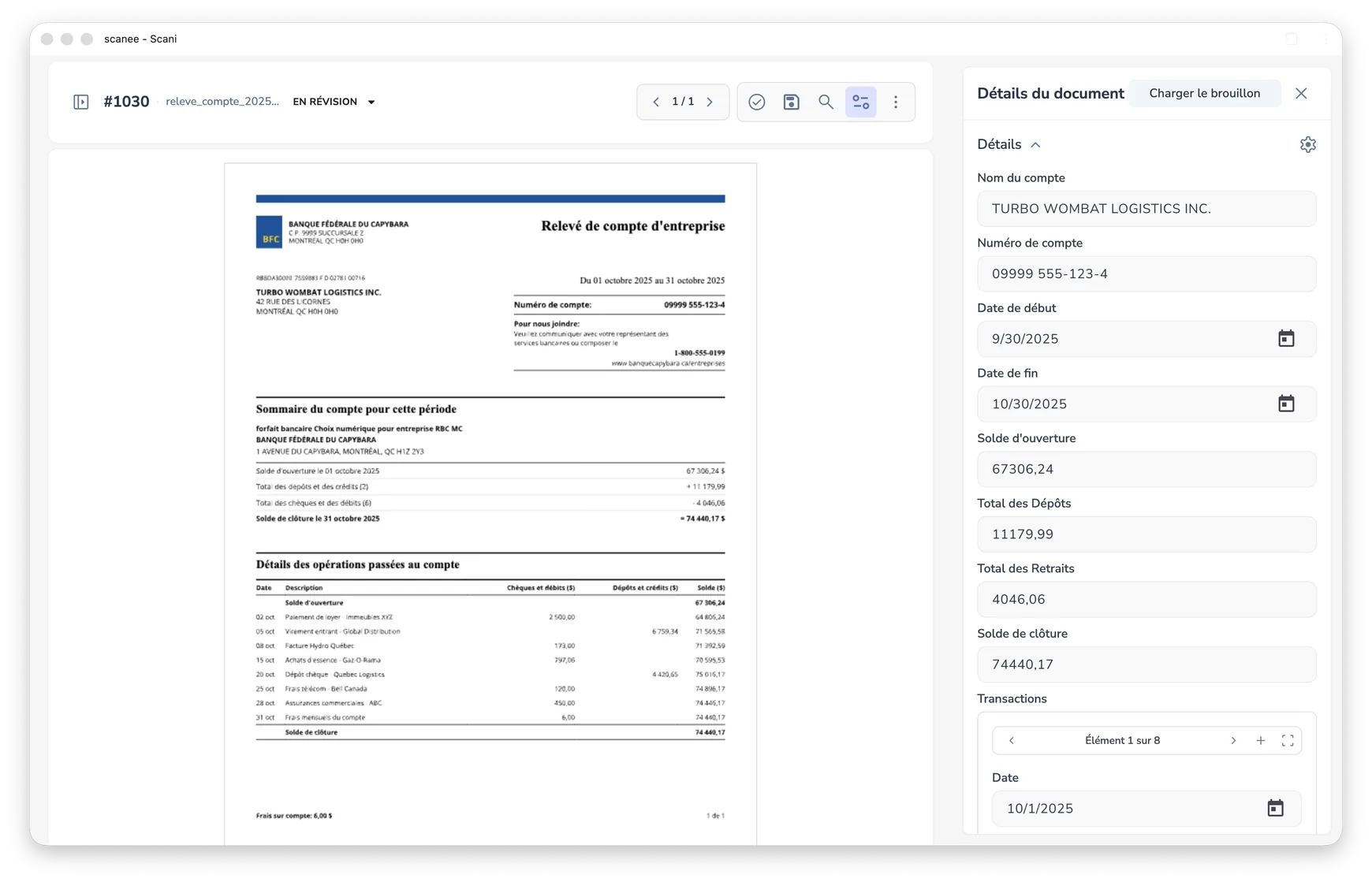
From the PDF you receive to your ERP, with zero typing.
Watch your documents make the trip: split, read, verified, then sent wherever you need them.

See the AI in action
Drag and drop your own invoice to test instant AI extraction.
Your team deserves better than manual data entry.
Hundreds of vendor invoices arrive each week by email, in various formats, creating processing bottlenecks.
Your team spends 70% of their time opening PDFs, retyping totals, and keying data into ERP systems.
Without audit trails, you can't track who entered what. Fixing data entry errors is expensive and slow.
A complete platform for extracting and processing your documents.
Advanced OCR and AI models to read and understand any document — invoices, statements, delivery dockets.
Automatically locate and frame physical defects, structural anomalies (corrosion, cracks, damaged racks), and equipment parts on field photos.
Most tools make mistakes. Scanee lets you compare the original document and extracted data side by side before exporting.
Scanee imports your suppliers, GL accounts, and cost centres from your ERPs, then matches each invoice automatically.
Native Microsoft Dynamics 365 Business Central, Intuit QuickBooks, Sage, Odoo, and Xero connectors, plus CSV/Excel exports. One click to export.
Send data to Google Sheets or Excel Online, and pull and file your PDFs in Drive, OneDrive, Dropbox, or SharePoint. Zapier, Make, and the API cover the rest.
Direct synchronization with your ERP and your tools.
Send invoices straight to your ERP with their attachment, export the data to your spreadsheets, and use your own cloud storage.
- Accounting & ERP
- Dynamics 365 Business Central QuickBooks Online Sage Accounting Odoo ERP Xero
- Spreadsheets
- Google Sheets Excel Online
- Storage
- Google Drive OneDrive Dropbox SharePointAmazon S3 Google Cloud Storage Azure Blob Storage SFTP
- Automation
- Zapier Make
 QuickBooks Online
  Sage Accounting
  Odoo ERP
  Xero
Xero  Google Sheets
  Excel Online
  Google Drive
  OneDrive
  Dropbox
  SharePoint
  Amazon S3
  Google Cloud Storage
  Azure Blob Storage
  SFTP
SFTP  Zapier
  Make
Make  Native Integration
Approve in Scanee: the purchase invoice is created instantly in Business Central with line items, tax breakdown, and attached original source PDF.
Authorize Scanee with your Microsoft 365, Intuit, Sage, Odoo, or Xero account. Your companies and environments are detected automatically.
As soon as an invoice is approved, it is pushed instantly into Business Central, QuickBooks, Sage, Odoo, Xero, or your tools.
Send data to Google Sheets or Excel Online. Pull invoices from Drive, OneDrive, Dropbox, or SharePoint, and file the PDFs back once processed.
Business Central, Excel, OneDrive, SharePoint, QuickBooks, Sage, Odoo, Xero, Google Sheets, Google Drive, Google Cloud Storage, Dropbox, Amazon S3, Azure, Zapier, and Make are trademarks of their respective owners. Scanee is not affiliated with, endorsed by, or sponsored by these companies.
Simple, transparent, no surprises
Everything you need to automate your invoice processing.
What documents can Scanee process?
Any of them. Invoices, receipts, bank statements, purchase orders, forms, or contracts: Scanee extracts information from any PDF or image (PNG, JPEG), including scanned documents.
How does Scanee adapt to my documents?
Two ways. You can define the fields to extract yourself, telling the AI what information to look for. Or drop in a sample document and let the AI identify the fields for you. Either way, that template is then applied automatically to every new document, with no model to train.
Can Scanee analyze photos?
Yes. Beyond text, Scanee detects and locates objects or damage in images, for example during field inspections: equipment, defects, corrosion.
Does Scanee work with my accounting software?
Yes, with native integrations for Microsoft Dynamics 365 Business Central, QuickBooks Online, Sage Accounting, Odoo, and Xero. The approved invoice is created there with its lines, taxes, and the PDF attached. For other systems, export to CSV or Excel, use Zapier or Make, or connect through the API.
Is it complicated to connect my ERP or my storage?
No, each connection takes one click: you authorize Scanee with your usual account, and that's it. This applies to your ERP, your spreadsheets (Google Sheets, Excel Online), and your storage (Google Drive, OneDrive, Dropbox, SharePoint), with no development and no integration fees.
Do I need a credit card to try it?
No. The 14-day trial is free and requires no credit card. You can also test the extraction on this page with your own invoice, without creating an account.
How accurate is the extraction?
The AI reaches 99.4% accuracy on extracted fields. And you keep the final say: each document is shown next to the extracted data, so you can check and correct it at a glance before exporting.
Can Scanee code invoices to the right accounts?
Yes. Scanee imports your suppliers, GL accounts, and cost centres from your ERP, or from your own lists if your ERP isn't connected. It then matches each invoice to the right account automatically, and you approve or adjust before it is sent.
How do invoices get into Scanee?
Drag and drop your files, or connect a Google Drive, OneDrive, Dropbox, or SharePoint folder and Scanee picks up new invoices automatically. On the Pro and Scale plans you can also forward them by email or send them through the API.
Where is my data hosted?
In Canada, in compliance with Quebec's Law 25 and PIPEDA. You can also keep your documents in your own storage: Google Drive, OneDrive, Dropbox, or SharePoint from the Pro plan, and Amazon S3, Google Cloud Storage, Azure, or SFTP on the Scale plan. Zero retention is available.
How do credits work?
One credit usually processes one document; a more complex document may use more. Plans include 500, 1,000, or 2,500 credits per month, starting at CA$39.
Is Scanee complicated to set up?
No, it takes a few minutes. Create your account, drop in your first documents, and extraction starts, with no installation and no development.
Need custom onboarding or high volume?
Talk with our product experts to review your workflows, custom ERP connectors, and enterprise security requirements.
Upload a sample of your invoices or custom forms to see live extraction results.
Dedicated support to connect Scanee to your ERP (Business Central, QuickBooks, Sage, Odoo, Xero, etc.).
100% Canadian data residency (Law 25 / PIPEDA compliant) and BYOS (Bring Your Own Storage) option.